Tech updates
Share this

by Techupdate on Oct 29, 2024, 11:53:14 AM
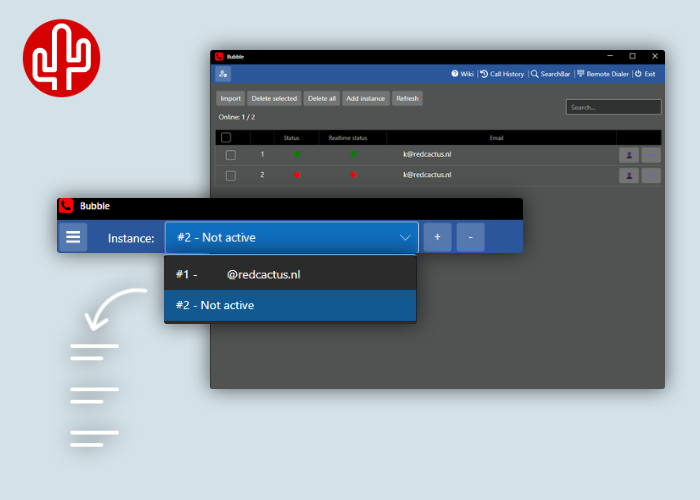
Perhaps the most hidden feature of Bubble: multi-tenant mode. How do you activate it, and why should you use it? Discover two clever use cases here.
#1 Save time on installation
With Bubble's multi-tenant mode, you can onboard new clients quickly without ever having to be on-site—everything can be managed from your own PC. By enabling multi-tenant mode in Bubble, you can effortlessly switch between your own account and a client account, eliminating the hassle of constantly logging in and out. During the setup, you can easily log in with the client account using a one-time password (OTP) file generated in the partner portal. This file, which is valid for two hours, can be uploaded into Bubble for automatic login. This way, there's no need to create temporary passwords, making everything much more secure! Once you’ve completed the configuration, simply log out and Bubble will automatically roll out at the client’s site. The client will then only need to log in using single sign-on (via Microsoft, Google, or Apple account), after which their profile is automatically loaded and they can start working immediately.
#2 Self-hosting Bubble
Multi-tenant mode is also ideal for situations where you want to self-host integration tool Bubble. Consider configurations where Bubble is not needed locally on the user's desktop but acts as a gateway for a telephony module in a CRM system (for example, Realworks, Medicom, or Brio - Portima). It is also useful when using Bubble embedded (for example, in HubSpot, Salesforce, or Zendesk), Bubble universal iframe or in situations where you only use the automation module with if-this-then-that flows. You can keep hundreds of users actively engaged from a single environment. With the OTP feature in the partner portal, you can automatically log in all those users—without any manual hassle!
Activating multi-tenant mode
Activating multi-tenant mode for Bubble is simple: just add a file to the installation package, restart, and you’re all set! For more information, check our knowledge base by clicking here (note that you need to be logged in).